The 8 Best Time Blocking Apps in 2025
Time blocking transforms how you work. Instead of hoping you’ll find time for important tasks, you schedule them like meetings with yourself. The difference between people who consistently finish their most important work and those who constantly feel behind often comes down to this simple practice.
But time blocking fails when your tools work against you. Most productivity apps force you to juggle separate task lists and calendars, creating friction that kills the habit before it starts. The best time blocking apps eliminate this friction by putting everything in one view where you can see both your planned work and your actual commitments.
These are the best time-blocking apps available today. Each represents a different approach to solving the scheduling puzzle, from AI-powered automation to highly customizable manual systems. The apps that made this list excel at the fundamentals: they make scheduling tasks feel effortless, sync reliably across devices, and integrate seamlessly with existing workflows. Whether you’re managing multiple projects, coordinating with teams, or just trying to find time for deep work, these tools will help you take control of your schedule.
The Best Time Blocking Apps
Todoist for task-first users who want flexible scheduling
TickTick for comprehensive productivity on a budget
Motion for AI-powered automatic scheduling
Sunsama for mindful daily planning and reflection
Google Calendar for simple, free time blocking
Amazing Marvin for highly customizable workflows
Akiflow for rapid task processing and scheduling
Morgen for unified calendar management
What Makes the Best Time Blocking App?
The difference between time-blocking apps that actually get used and those that get abandoned after a week comes down to a few critical factors. The best apps understand that time blocking is fundamentally about reducing friction between intention and execution.
Frictionless scheduling. The best apps make it faster to schedule a task than to leave it unscheduled. This means drag-and-drop calendar interfaces, natural language input that actually works, and keyboard shortcuts that eliminate unnecessary clicking. If scheduling feels like extra work, you’ll stop doing it.
Unified view of tasks and calendar. You need to see your planned work blocks alongside your actual meetings and commitments. Apps that force you to switch between task lists and calendar views create cognitive overhead that undermines the entire system.
Reliable cross-platform sync. Your time blocking system only works if it’s available everywhere you work. The best apps sync instantly across desktop, mobile, and web platforms, with robust offline support that queues changes until you reconnect.
Integration with existing tools. Most professionals already use email, project management software, and team calendars. The best time blocking apps either replace these tools entirely with something better, or integrate so seamlessly that data flows between systems without manual work.
Flexibility for real-world chaos. Plans change constantly. The best apps handle interruptions gracefully, make rescheduling effortless, and provide realistic ways to deal with tasks that take longer than expected without destroying your entire day’s structure.
Sustainable daily workflows. Time blocking is a habit, not a one-time setup. The best apps support daily planning rituals, weekly reviews, and long-term project management in ways that feel sustainable rather than overwhelming.
Best Time Blocking App for Task-First Users
Todoist
Standout feature: Two-way calendar sync that makes scheduled tasks appear as actual events in Google Calendar and Outlook.

Todoist Pros:
- Excellent natural language processing for quick scheduling
- True two-way sync with external calendars prevents double-booking
- Robust project organization that scales from personal use to team coordination
- Reliable cross-platform sync with strong offline support
Todoist Cons:
- Calendar features require Pro subscription ($4/month)
- AI assistant is basic compared to newer competitors
- Interface can feel cluttered when managing many projects
Todoist excels for people who naturally think in terms of projects and tasks, and then figure out when to execute them. The app evolved from a pure task manager into a surprisingly capable time-blocking platform without losing its organizational strengths.
The calendar view transforms your familiar project lists into a timeline where you can drag tasks directly onto specific time slots. When you schedule a task, Todoist automatically sets a duration (default 15 minutes) that you can adjust by dragging the edges. This makes the transition from “write quarterly report” to “write quarterly report Tuesday 2-4pm” feel effortless.
What sets Todoist apart is the calendar integration quality. Your scheduled tasks sync to Google Calendar or Outlook as actual calendar events, complete with proper titles and durations. Meanwhile, meetings from external calendars appear as colored blocks in Todoist, giving you a unified view that prevents accidental double booking.
The natural language input genuinely saves time. Type “Review budget proposal tomorrow at 10am for 90 minutes” and Todoist automatically parses the task name, date, time, and duration. Recurring tasks work with flexible patterns like “every Monday” or “first Tuesday of each month,” and these recurring items appear properly in both the task list and calendar view.
Recent updates include enhanced deadline tracking, improved Outlook integration, and mobile calendar editing where you can adjust task durations by dragging handles directly on your phone. The AI assistant helps generate project templates and break down complex tasks, though it doesn’t handle automatic scheduling.
Best for: Project managers, consultants, and anyone who needs robust task organization with optional calendar scheduling. Ideal if you already use Google Calendar or Outlook and want deeper task integration.
Todoist pricing: Free version supports up to 5 projects and basic features. Pro plan ($4/month annually) unlocks calendar views, unlimited projects, and advanced features.
Best Budget Time Blocking App
TickTick
Standout feature: Built-in calendar eliminates external integrations while including habits, focus timers, and Eisenhower matrix for under $3/month.
TickTick Pros:
- Comprehensive feature set rivals apps costing 3x more
- Native calendar integration works without external dependencies
- Excellent habit tracking and focus timer integration
- Highly customizable interface reduces visual clutter
TickTick Cons:
- Calendar view requires a Premium subscription
- One-way sync with external calendars (can import but not export)
- Interface density can overwhelm users who prefer minimalism
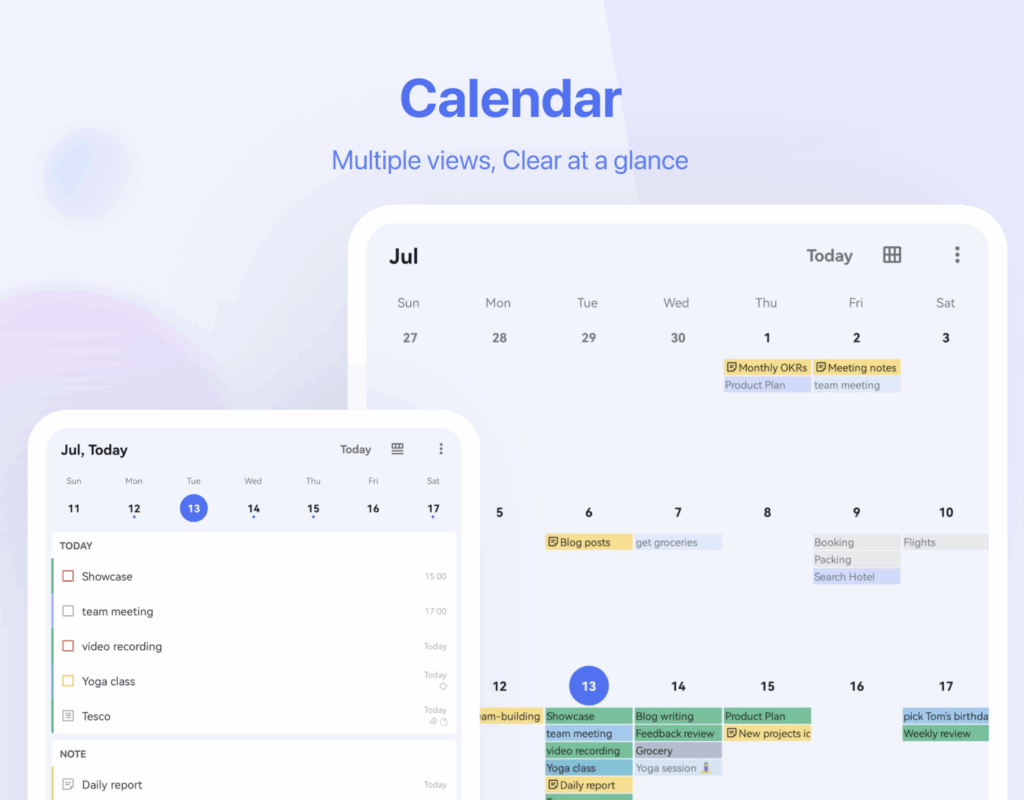
TickTick delivers exceptional value by building calendar functionality directly into the app rather than depending on external integrations. You get task management, calendar views, habit tracking, focus timers, and project organization in one cohesive package.
The integrated calendar tab displays tasks and events together in day, week, or month layouts. In the week view, you can drag tasks into time slots exactly like scheduling meetings. TickTick supports setting both start times and durations for tasks, creating a genuine hybrid calendar-task experience without switching between apps.
While the calendar view requires Premium, TickTick can subscribe to external calendars like Google Calendar to display your meetings alongside tasks. The integration works one way but covers most use cases for people who want everything visible in one place.
The habit tracking integration particularly stands out. You can schedule recurring habits like “exercise,” “reading,” or “meditation” that appear as calendar blocks on their scheduled days. This helps you allocate time for important routines alongside work tasks.
TickTick includes powerful productivity features often missing from more expensive apps. The Eisenhower Matrix helps you categorize tasks by urgency and importance. The Pomodoro timer integrates with your scheduled tasks. Custom themes and extensive layout options let you hide unused features and focus on what matters.
The free tier is genuinely useful—up to 9 lists, 99 tasks per list, and core features. Premium costs just $35.99 annually (under $3/month), making it the most affordable comprehensive option.
Best for: Students, small business owners, and budget-conscious professionals who want comprehensive productivity features without the premium price tag.
TickTick pricing: Free version includes 9 lists and 99 tasks per list. Premium ($35.99/year) unlocks a calendar view, unlimited tasks, and advanced features.
Best AI-Powered Time Blocking App
Motion
Standout feature: AI automatically schedules your tasks around meetings and priorities, continuously optimizing your calendar as conditions change.
Motion Pros:
- Eliminates decision fatigue by automating scheduling decisions
- Continuously reschedules tasks as priorities and meetings change
- Excellent for people with unpredictable schedules
- Strong deadline management prevents important work from slipping
Motion Cons:
- Expensive at $19/month, especially for individual users
- Requires trust in algorithmic scheduling decisions
- Limited customization compared to manual planning apps
- AI can make questionable scheduling choices during busy periods
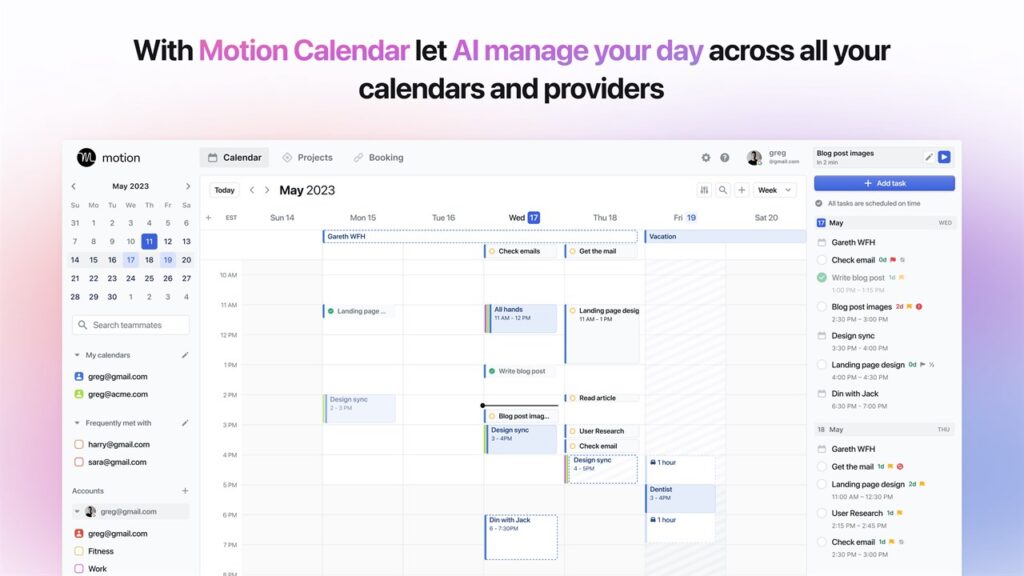
Motion represents a fundamentally different approach to time blocking. Instead of manually scheduling every task, you define what needs to be done and let AI figure out when to do it. For busy professionals drowning in competing priorities, this automation can be genuinely transformative.
You input tasks with deadlines, estimated durations, priority levels, and any scheduling constraints. Motion’s AI then allocates time slots around your existing meetings and commitments. When new meetings appear or tasks take longer than expected, Motion automatically reschedules everything else to accommodate the changes.
The AI considers multiple factors: your working hours, energy levels throughout the day, task types you prefer at certain times, and deadline urgency. It pushes less urgent work to later when higher priorities emerge, and fills calendar gaps with appropriately sized tasks.
Motion works particularly well for people with chaotic schedules—executives, consultants, or anyone juggling multiple clients and projects. The AI handles the cognitive overhead of constantly replanning your day while ensuring deadline-driven work gets proper attention.
The interface prioritizes functionality over aesthetics. You can customize working hours, focus time preferences, and task categorization, but the real customization happens through teaching the AI your constraints and preferences over time.
The system requires internet connectivity since AI scheduling happens on Motion’s servers. Mobile apps provide full schedule access and task management, but the optimization engine runs in the cloud.
Best for: Executives, consultants, and busy professionals with unpredictable schedules who want to eliminate manual planning overhead. Ideal for people who struggle with traditional time blocking because priorities change too frequently.
Motion pricing: Individual plan starts at $19/month annually ($228/year) with a 7-day free trial. Business plans available for teams.
Best Time Blocking App for Mindful Planning
Sunsama
Standout feature: Daily planning ritual that imports tasks from multiple tools into a unified calendar view with built-in reflection and work-life balance guidance.
Sunsama Pros:
- Excellent integration with popular productivity tools (Todoist, Trello, Asana, Gmail)
- Encourages sustainable work habits and realistic daily planning
- Thoughtful features for handling incomplete tasks and overcommitment
- Clean, distraction-free interface promotes focus
Sunsama Cons:
- No free plan—trial only, then $16/month minimum
- Requires internet connection for tool integrations
- Limited standalone task management compared to dedicated apps
- Daily planning rituals may feel restrictive for spontaneous workers
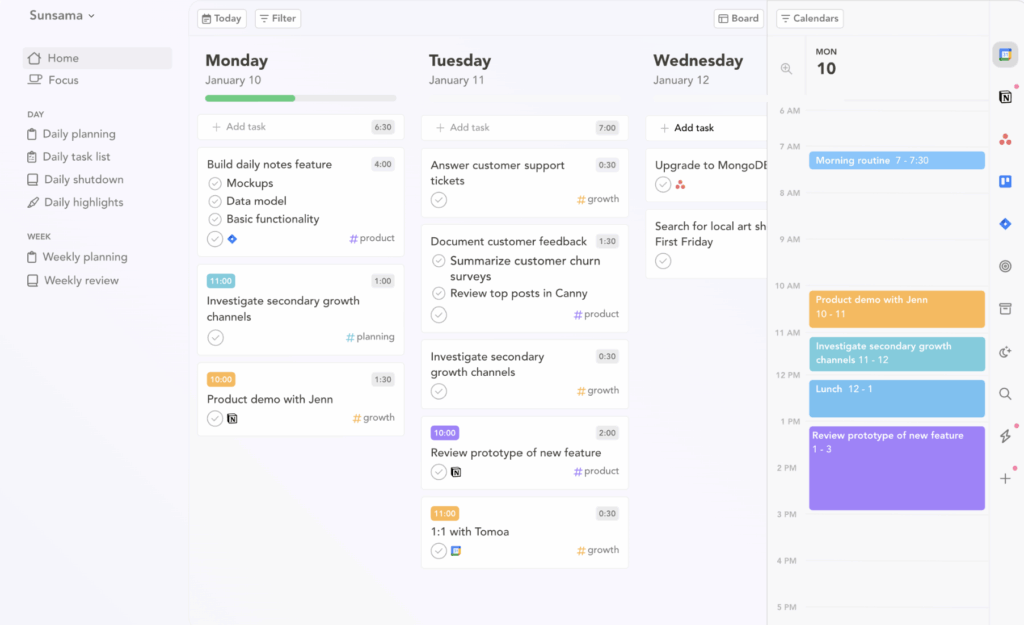
Sunsama transforms time blocking into a mindful daily practice. Rather than just scheduling tasks, it guides you through intentional planning, execution tracking, and evening reflection to build sustainable productivity habits.
The core workflow involves importing tasks from your existing tools Todoist, Trello, Asana, Gmail, Slack into Sunsama’s daily view, then scheduling them by dragging to specific time slots. This creates actual calendar events while keeping the original tools updated through two-way sync.
This integration-first approach works brilliantly for teams using multiple productivity platforms. Import a Trello card, schedule it for 2pm, and mark it complete in Sunsama—the original Trello card automatically updates. The same seamless workflow applies to tasks from any connected service.
Sunsama encourages realistic planning through gentle guidance about daily workload limits and built-in features for handling tasks that don’t get completed. Instead of carrying guilt about unfinished work, you can easily reschedule tasks or break them into smaller pieces.
The daily shutdown ritual prompts reflection on accomplishments and tomorrow’s priorities. This creates closure between work days while ensuring nothing important gets forgotten. Weekly planning views help maintain perspective on longer-term goals.
Recent AI additions include automatic time estimates based on your historical data and smart task categorization. The interface intentionally stays calm and focused, avoiding the feature bloat that makes other productivity apps overwhelming.
Best for: Knowledge workers, remote teams, and professionals who want to consolidate multiple productivity tools while building sustainable work habits. Ideal for people who struggle with work-life boundaries.
Sunsama pricing: 14-day free trial, then $20/month or $16/month annually ($192/year). No free plan available.
Best Free Time Blocking App
Google Calendar
Standout feature: Deep integration with Google Tasks creates a surprisingly capable time-blocking system that costs nothing and works everywhere.
Google Calendar Pros:
- Completely free with excellent cross-platform availability
- Native Google Tasks integration eliminates separate app downloads
- Automatic event creation from Gmail (flights, meetings, deliveries)
- Reliable sync and offline support across all devices
Google Calendar Cons:
- Limited task management features compared to dedicated apps
- No advanced project organization or recurring task templates
- Minimal AI assistance beyond basic Goals feature
- Interface lacks modern productivity features
Google Calendar earns its place not because it’s the most sophisticated option, but because it delivers solid time-blocking functionality at zero cost while integrating seamlessly with tools most professionals already use.
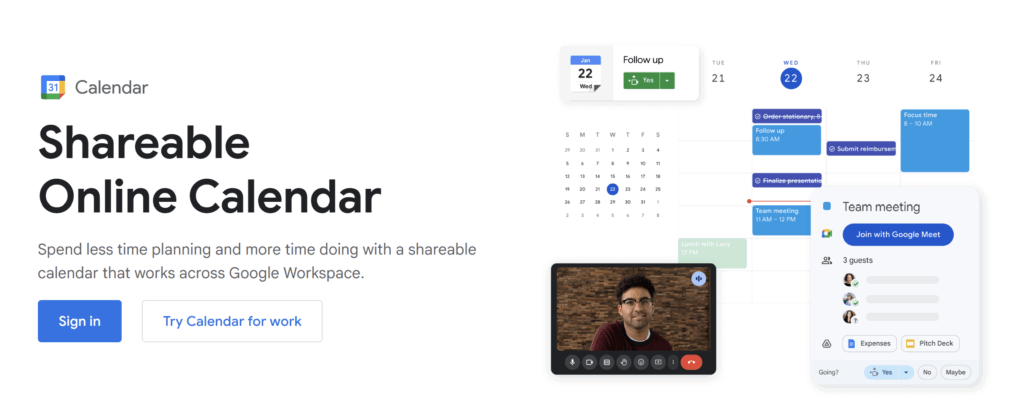
The 2024 Google Tasks integration transformed Google Calendar into a legitimate time-blocking platform. Tasks now appear directly within the calendar interface—there’s a dedicated panel on the web and full task management built into the Android calendar app. You can create tasks, organize them into lists, and drag them directly onto calendar time slots.
Scheduled tasks appear on your calendar with checkmark icons, while tasks with only due dates show as all-day items. For more control, many users create calendar events directly rather than using Tasks, which provides complete duration and scheduling flexibility.
The ecosystem integration provides genuine value beyond basic scheduling. Calendar events automatically generate from Gmail confirmations, meeting invites appear instantly, and you can attach Google Drive files to any event. Everything syncs across devices without configuration.
Google’s Goals feature on mobile can automatically find time for recurring activities like exercise or learning. While not as sophisticated as dedicated AI scheduling, it handles basic recurring time allocation effectively.
The interface follows familiar calendar conventions that require no learning curve. Drag-and-drop rescheduling works smoothly, and color coding helps categorize different types of work. Everything happens manually, which some users prefer for maintaining complete control.
Best for: Students, small teams, and anyone who wants straightforward time blocking without subscription costs. Ideal if you already use Gmail and Google Drive extensively.
Google Calendar pricing: Free with Google account. Google Workspace plans to start at $6/user/month for business features.
Best Customizable Time Blocking App
Amazing Marvin
Standout feature: Modular productivity system that lets you enable only the features you need, from basic time blocking to complex project management with ADHD-friendly customizations.
Amazing Marvin Pros:
- Unprecedented customization lets you build your ideal productivity system
- Excellent for ADHD and neurodivergent users who need specific accommodations
- Time blocking integrates with dozens of other productivity methodologies
- Active development community and responsive support
Amazing Marvin Cons:
- Steep learning curve requires significant setup investment
- Can become overwhelming with too many features enabled
- More expensive than simpler alternatives at $8/month
- Interface complexity may intimidate casual users
Amazing Marvin takes a radically different approach by letting you build your perfect productivity system from modular components. Instead of forcing you to adapt to the app’s workflow, Marvin adapts to how your brain actually works.
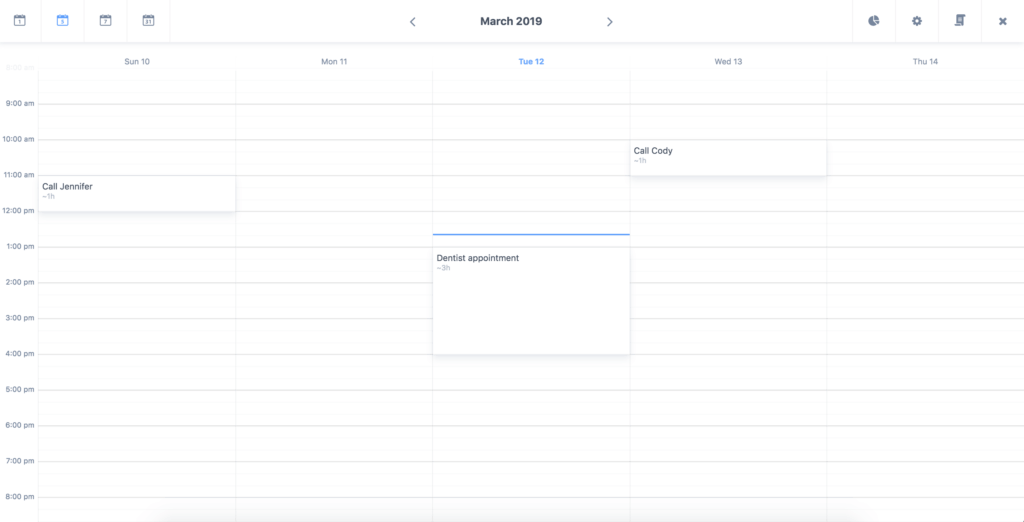
The time-blocking implementation is sophisticated and flexible. The daily agenda view lets you schedule tasks into specific time slots with full Google Calendar integration. But you can also enable complementary features like time tracking, project templates, deadline management, or habit integration based on your specific needs.
What makes Marvin unique is the ability to combine productivity methodologies. You might enable time blocking alongside the Getting Things Done project organization, Eisenhower Matrix prioritization, and Pomodoro focus sessions. Each feature can be toggled on or off, and the interface adapts to show only what you’re actually using.
This flexibility particularly benefits neurodivergent users who struggle with one-size-fits-all productivity systems. You can enable features like task randomization for decision paralysis, reward systems for motivation, or visual progress tracking for sustained focus. The community shares custom configurations for specific needs like ADHD, depression, or chronic illness.
The learning curve is admittedly steep. Marvin can feel overwhelming initially because there are so many configuration options. The developers recommend starting with basic features and gradually adding complexity, which is solid advice for avoiding feature paralysis.
For users who stick with the setup process, Marvin often becomes their permanent productivity solution. The ability to evolve your system as your needs change eliminates the cycle of app-hopping that plagues many productivity enthusiasts.
Best for: Productivity power users, neurodivergent individuals, and anyone who has tried multiple systems but needs something more personalized. Ideal for people who enjoy optimizing their workflows.
Amazing Marvin pricing: $8/month annually or $12/month monthly. 30-day free trial available.
Best Time Blocking App for Speed
Akiflow
Standout feature: Keyboard-first interface with unified inbox that consolidates tasks from multiple sources for rapid processing and scheduling.

Akiflow Pros:
- Extremely fast task processing with keyboard shortcuts and quick commands
- Unified inbox aggregates tasks from email, Slack, project management tools
- Time Slots feature creates recurring blocks for routine work
- Native desktop apps provide snappy performance
Akiflow Cons:
- Expensive at $19/month for what’s essentially a scheduling interface
- Steep learning curve for keyboard shortcuts and command syntax
- Mobile apps still in beta with limited functionality
- Overkill for users who prefer simple, visual interfaces
Akiflow targets professionals drowning in tasks from multiple sources who need maximum efficiency in processing and scheduling. If you spend significant time moving tasks between email, Slack, project management tools, and your calendar, Akiflow’s consolidation approach can dramatically reduce that overhead.
The unified inbox pulls tasks from Gmail, Slack, Todoist, Asana, Trello, and other tools into one interface alongside your calendar. You then rapidly sort and schedule these items using keyboard shortcuts or drag-and-drop. The goal is eliminating the constant app-switching that fragments attention throughout the day.
The keyboard-first approach sets Akiflow apart from more visual competitors. You can select a task and press hotkeys to schedule it “tomorrow 10am” in seconds or use quick commands to type scheduling instructions directly. Power users often find they can process daily task intake much faster than with mouse-heavy interfaces.
Time Slots let you create recurring calendar blocks for specific activities—like “Email Processing” every day at 4pm or “Deep Work” on Tuesday mornings. You can then drag tasks into these predefined slots, which works well for routine work that needs regular time allocation.
The desktop experience is where Akiflow excels, particularly for users managing high task volumes across multiple communication channels. The interface prioritizes function over form, focusing on rapid task processing rather than visual appeal.
While basic drag-and-drop works immediately, realizing Akiflow’s full potential requires learning the keyboard shortcuts and command syntax. Users who make this investment often report significant time savings in daily planning overhead.
Best for: Executives, project managers, and busy professionals managing high task volumes across multiple tools. Ideal for keyboard-preferring power users who value speed over visual polish.
Akiflow pricing: $19/month annually or $34/month monthly. 7-day free trial available.
Best Multi-Calendar Time Blocking App
Morgen
Standout feature: Universal calendar interface that unifies multiple calendar accounts with basic task management, including Linux support.
Morgen Pros:
- Excellent multi-calendar support (Google, Outlook, iCloud, CalDAV)
- Native Linux support rare among productivity apps
- Clean interface with smart scheduling suggestions
- Free tier covers basic multi-calendar needs
Morgen Cons:
- Task management features lag behind dedicated time-blocking apps
- Integrations feel shallow compared to comprehensive alternatives
- Limited offline functionality compared to native calendar apps
- Pro features are expensive relative to functionality
Morgen excels for people who primarily think in calendar terms but want basic task integration as a useful addition. It’s particularly valuable for professionals managing separate personal and work calendar accounts, or Linux users who have limited productivity app options.
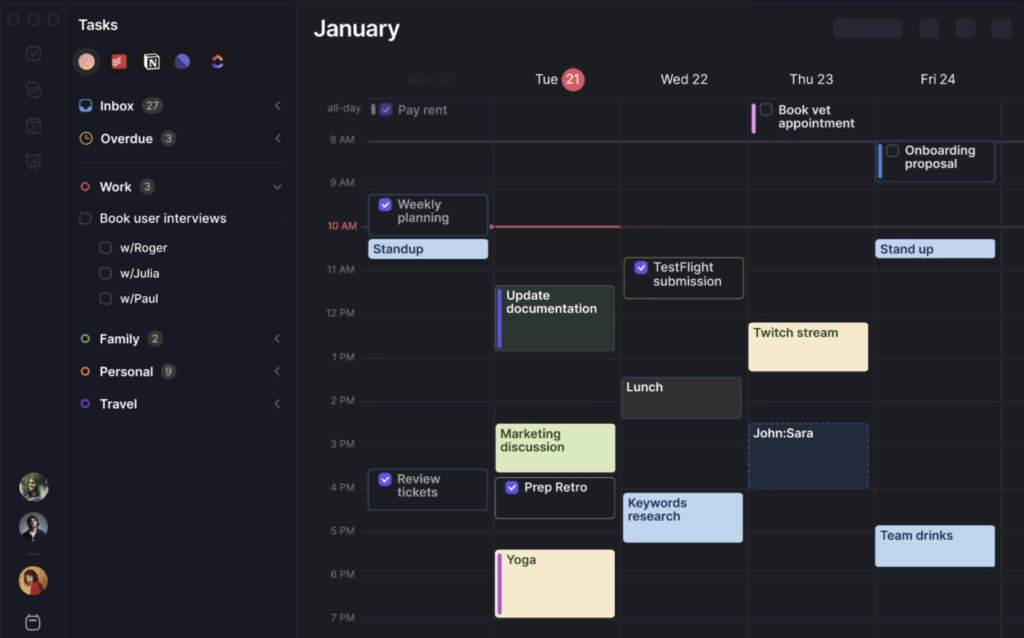
The core strength is calendar unification. You can connect Google, Outlook, iCloud, and any CalDAV service to see all your calendars together in one clean interface. This eliminates the constant switching between different calendar apps that fragments many professionals’ scheduling workflows.
For tasks, Morgen integrates with major task managers like Todoist, Microsoft To Do, and Trello, displaying those items alongside calendar events. You can also create simple tasks directly within Morgen and schedule them by dragging them onto time slots. Updates sync back to source applications, maintaining consistency across your toolkit.
The interface includes helpful scheduling features like optimal time slot highlighting, travel time consideration between meetings, and conflict detection. These guided planning tools help with manual scheduling without requiring AI automation.
Cross-platform support is outstanding, with native apps for Windows, macOS, Linux, iOS, and Android. The Linux support alone makes Morgen notable since few productivity apps serve that platform well. Sync happens through your connected accounts rather than Morgen’s servers, which appeals to privacy-conscious users.
The free tier covers basic calendar management and simple task integration. The Pro plan unlocks multiple calendar accounts, full task app integrations, and scheduling links, though the pricing feels steep for the additional functionality.
Best for: Linux users, professionals managing multiple calendar accounts, and anyone who wants unified calendar viewing with light task integration. Ideal for calendar-first thinkers who don’t need sophisticated task management.
Morgen pricing: Free tier for basic use. Pro plan $15/month annually or $30/month monthly.
Which Time Blocking App Should You Choose?
Time blocking is deeply personal, what works for your brain and workflow might feel clunky to someone else. The good news is that most of these apps offer free trials or free tiers, so you can test a couple of options without commitment. Try the ones that match your natural work style, and stick with whichever makes scheduling feel effortless rather than like extra work.