Why Bidirectional Linking Helps Your Notes Work Like Your Brain Does
Have you ever written down an important idea, only to forget where you put it? Or spent time searching through folders and tags, trying to locate that perfect quote or reference you know you saved?
Despite taking careful notes, many people struggle to find and connect their information when they need it most. This happens because traditional note-taking systems don’t match how our brains naturally work.
Our minds create connections between ideas automatically. When you think about coffee, your brain might link it to morning routines, caffeine, favorite cafes, or productivity. Traditional notes don’t capture these natural connections, but there’s an approach that does.
If you’re already using systems like Building a Second Brain or Getting Things Done (GTD), you know how organizing information properly makes life easier. Bidirectional linking makes these systems even better by automatically connecting related notes, so you can find information faster without extra work.
What Is Bi-Directional Linking?
Bi-directional linking creates two-way connections between notes. When you link from Note A to Note B, the system automatically shows that relationship in both places.
Unlike regular folders, where a note lives in just one location, bi-directional linking allows ideas to exist in multiple contexts simultaneously. This mirrors how your mind naturally thinks about information.
For example, if you write about sleep habits and link to your exercise note, you’ll see that connection from both directions. When reviewing exercise later, you’ll be reminded of its relationship to sleep quality without having to search.
Bi-directional linking has been around for decades, but has gained new popularity through modern note-taking apps like Obsidian, Logseq, Reflect Notes, and Tana. These apps help organize information in a way that mirrors how the brain naturally connects ideas.
How Do Traditional Note Systems Differ From Bidirectional Ones?
Traditional note organization typically relies on:
- Folders (one note in one location)
- Tags (helpful but require maintenance)
- Search (only works if you remember the right terms)
These methods place the burden of organization and retrieval on you. Bidirectional linking shifts this responsibility to your note system by:
- Automatically tracking connections between ideas
- Showing related notes without manual searching
- Revealing unexpected relationships between topics
- Growing more valuable as your collection expands
Instead of isolating notes in separate folders, bidirectional linking creates a network of interconnected thoughts, making your notes easier to navigate.
Why Are Bidirectional Links Different From Regular Hyperlinks?
A standard hyperlink works like this:
- Note A → Note B (one-way direction; B doesn’t “know” about A)

A bidirectional link works like this:
- Note A ↔ Note B (mutual awareness; A and B both recognize the link)
When you click a regular hyperlink, you move from one page to another. But the destination page has no record of where you came from. Bidirectional links solve this problem by remembering connections in both directions.
This small but powerful difference means you can travel back and forth between related notes without losing your path, similar to how your memory naturally connects related ideas.
Who Benefits Most From Connected Notes?
Bi-directional linking helps people who:
- Researchers and students collecting information from various sources
- Writers connecting ideas across different projects
- Professionals who work primarily with information and ideas
- People building personal knowledge systems (PKMS) for their own learning and growth
- Anyone managing long-term projects with many moving parts
The system’s value grows over time as your notes accumulate and form a more comprehensive network. For people using the Second Brain method or following GTD, bidirectional linking works like an upgrade.
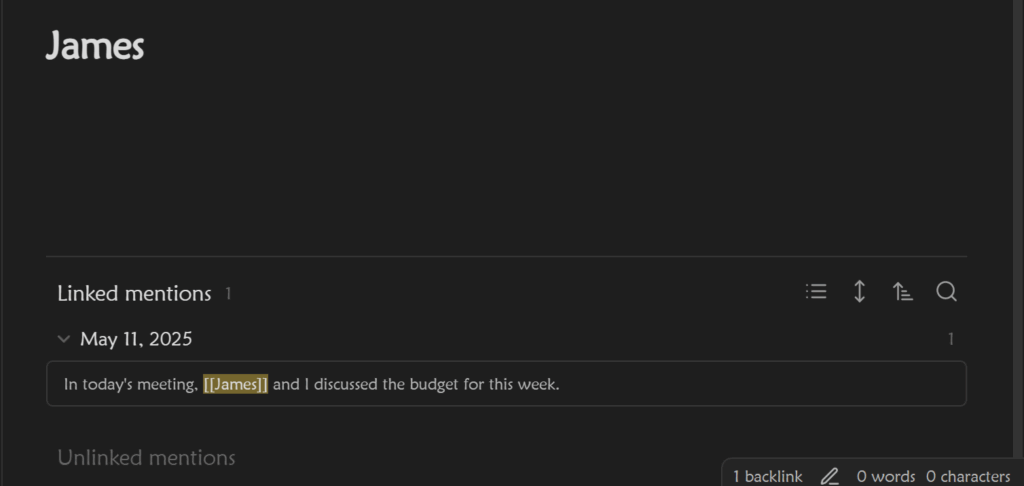
Here’s a simple example: In your note system, you might keep a list of important contacts. With bidirectional linking, whenever you mention someone in meeting notes by typing [[Name]] or @Name, it automatically links to their information. Later, when looking at a person’s profile, you’ll see every meeting where you discussed them, without any manual cross-referencing or tagging.
One Reddit user describes their experience: “I believe bidirectional links are great to organize your thought process and organization… For example, I do a weekly review once a week, so I look at every backlinked mention in my work and personal logs notes and I can see what I accomplished, how I felt, and all of the challenges of the week.”
Which Apps Make Bi-Directional Linking Simple?
As more people discover the benefits of connected notes, bidirectional linking has become a key feature in many popular note-taking apps. What was once a specialized tool has now moved into mainstream note-taking platforms, with each offering their own approach to linking related information.
Several apps now include this feature as part of their core functionality:
- Obsidian: Free for personal use, works with local markdown files
- Logseq: Open-source with a focus on privacy and daily journaling
- Reflect Notes: Clean interface with calendar integration
- Roam Research: Early pioneer with robust features (subscription-based)
- Capacities: Modern interface with powerful linking and AI features
- Notion: Popular all-in-one workspace that now supports bidirectional linking
Most of these apps work across computers and mobile devices, though features vary by platform.
In these note-taking apps, bidirectional linking is often called “backlinking” because of how it works. Whenever you create a link from one note to another, the system automatically generates a backlink, meaning the destination note also displays a reference to the original note. This happens without any extra work on your part.

For creating these connections, most apps use double brackets [[ ]] around text to create internal links, while others, like Notion, rely on @mentions to reference other pages.
- Obsidian & Reflect Notes: Typing [[Productivity Hacks]] in a note will automatically create a link to that note, and the destination note will display a backlink to the original.
- Notion & Coda: Typing @Productivity Hacks will reference an existing page, showing its connection but often lacking automatic backlinking.
- LogSeq & Tana: Similar to Obsidian, they use [[ ]] for linking, but LogSeq also supports hierarchical structures.
How Do You Create Effective Linking Note Connections?
Starting with bi-directional linking is simpler than it might seem:
- Create topic notes for subjects you reference frequently
- Link to these topics when mentioning them in other notes
- Check the backlinks section to see what notes reference the current topic
- Follow connections to rediscover related ideas
For example, if you maintain a note about “Healthy Recipes,” you might link to it from your notes on meal planning, grocery shopping, and specific ingredients. Later, when looking at your recipe note, you’ll see all these connections listed as backlinks.
The magic happens when you follow these connections to rediscover information in new contexts.
What Makes A Good Linked Note System?
Effective bi-directional linking benefits from:
- Consistent naming of your main topic notes
- Meaningful links that create genuine connections
- Regular review of backlinks to discover relationships
- Progressive development allows the system to grow naturally
The goal isn’t to create as many links as possible but to build connections that help you find and use information effectively.
How Does This Method Change How You Manage Information?
Many people who adopt bi-directional linking report that it changes not just how they take notes, but how they think and manage information.
When you know your notes are connected, you become more aware of relationships between ideas. You might notice patterns across different areas of your life or work that weren’t apparent before.
This network approach encourages:
- Making connections between seemingly unrelated topics
- Revisiting ideas in new contexts
- Building knowledge incrementally over time
- Discovering insights through unexpected associations
Another Reddit user describes this as “happy accidents” in note-taking: “Those ‘happy accident’ and ‘insight-developing’ qualities of links can only be discovered over the course of time. You have to forget what you wrote and rediscover it.”
What Does Research Tell Us About Connected Notes?
The idea of interconnected note-taking is supported by research in knowledge management and information retrieval. A study titled “Knowledge Management System with NLP-Assisted Annotations” by Baihan Lin (2022) explores how traditional knowledge systems struggle with organizing information effectively.
The study proposes a Bidirectional Knowledge Management System (BKMS) that enhances how people store, retrieve, and connect ideas. This system helps users:
- Identify relationships between concepts more effectively
- Avoid information overload by structuring notes dynamically
- Improve the research and writing process through interconnected notes
These findings highlight why bidirectional linking can be an effective method for improving knowledge retention and organization. Instead of treating notes as standalone pieces, a networked note approach creates more opportunities for learning and discovery.
Will Bi-Directional Linking Work For You?
While many people benefit from connected notes, consider whether this approach matches your needs:
- Do you take notes regularly?
- Do you revisit notes after writing them?
- Do you work with complex, interconnected information?
- Do you value discovering unexpected connections?
If you answered yes to these questions, bi-directional linking likely offers significant benefits for your note-taking practice.
Remember that a connected note system grows more valuable over time, and let your network of knowledge develop naturally as you continue taking notes. As one user puts it, “It’s not about whether bidirectional links are useful, it’s about how you use them.”